

Withdrawal PANALOKO allows members to request funds from their casino accounts through verified payment methods under our platform’s transaction requirements. At PANALOKO, we provide a withdrawal interface featuring Main Wallet, recipient account information, and transaction history. This casino withdrawal guide helps players in the Philippines understand each step, review payment limits, and complete the necessary verification requirements before submitting a cash-out request.
How to Complete Withdrawal PANALOKO Step by Step
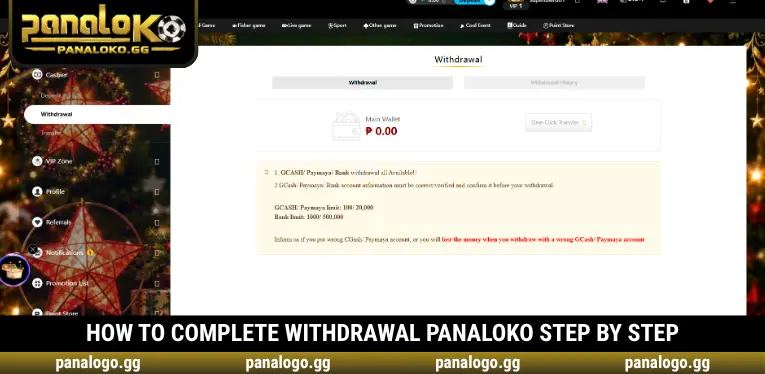
To complete Withdrawal PANALOKO, members must access the Withdrawal section and fill in the required fields before submitting a request. Our interface displays the available options clearly, allowing users to review their balance, recipient account information, and verification details.
Step 1 – Access the Withdrawal Section
After logging in to PANALOKO, open your account dashboard and select Withdrawal from the left-hand menu. The interface displays two tabs, Withdrawal and Withdrawal History, allowing members to submit new requests and monitor previous transactions. This section is the starting point whenever you want to withdraw funds from your casino account.
Step 2 – Check Your Main Wallet Balance
The Withdrawal page displays your Main Wallet balance, allowing you to verify the amount currently available. If your funds are stored in another wallet, you can use the One-Click Transfer function to move them to the main wallet before requesting a withdrawal. At PANALOKO, this helps prevent requests from being submitted when the required funds are not available in the correct wallet.
Step 3 – Complete Your Receiving Account Details
The Withdrawal PANALOKO form requires members to enter their Password, select Member Account Type, and provide the relevant Bank Account Holder or receiving account information. You must also ensure that your First Name and Last Name are completed correctly in your profile. The system may reject withdrawal requests when mandatory verification details are missing, making this step especially important for players in the Philippines.
Step 4 – Enter the Withdrawal Amount and Submit
Once the receiving account details are complete, enter your preferred amount in the Withdrawal Amount field according to the limits of your selected payment method. The Remarks field is optional and can be used to provide additional transaction information when necessary. After confirming that all details are accurate, click Submit to send your Withdrawal PANALOKO request for processing.
Step 5 – Monitor Your Request in Withdrawal History
After submitting your withdrawal request, open Withdrawal History to monitor its processing status instead of repeatedly submitting new requests. PANALOKO recommends checking the submission time, withdrawal amount, and selected payment method before contacting customer support. This approach is particularly useful for members who need to follow up on their transactions during busy processing periods.
Withdrawal Requirements and Limits at PANALOKO
Before submitting a Withdrawal PANALOKO request, members should carefully review the applicable transaction limits, supported payment methods, and mandatory verification requirements. Our platform supports GCash, PayMaya, and bank withdrawals, with clear notices emphasizing that recipient account information must be accurate and verified. Incorrect payment details or incomplete personal information may result in delayed or unsuccessful withdrawal requests.
| Payment Method | Withdrawal Limits | Important Requirements |
| GCash | ₱100 – ₱20,000 | Receiving account details must be accurate and verified |
| PayMaya | ₱100 – ₱20,000 | Confirm the correct e-wallet information before submitting |
| Bank Transfer | ₱1,000 – ₱500,000 | Provide accurate bank account holder information |
| Member Account | Depends on verification status | First Name, Last Name, and membership requirements must be satisfied |
| Available Balance | Depends on Main Wallet | Sufficient funds must be available in the main wallet |
Important Tips for Successful PANALOKO Withdrawals
When using Withdrawal PANALOKO, members should carefully review all information before clicking Submit to reduce processing delays and verification issues. Common difficulties may arise from incorrect recipient details, incomplete personal profiles, or funds being stored outside the Main Wallet. Following these precautions can help users in the Philippines submit more accurate withdrawal requests and avoid preventable transaction problems.
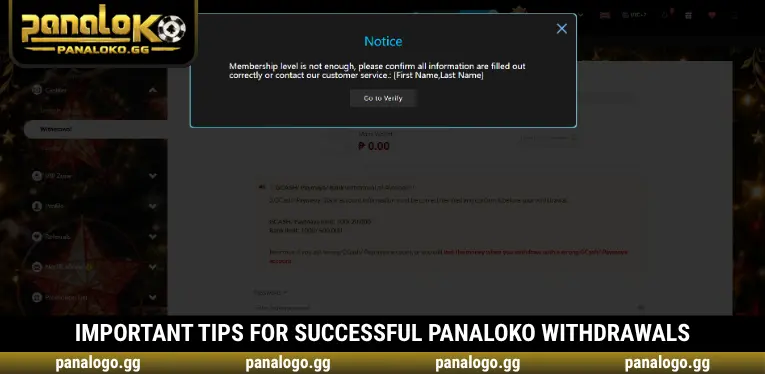
- Complete Your Personal Profile: Check that your First Name, Last Name, and required verification details are accurate. If information is missing, the system may display a “Membership level is not enough” notification and request additional verification.
- Maintain Sufficient Main Wallet Funds: Before requesting Withdrawal PANALOKO, confirm that your main wallet contains enough funds to cover the requested amount. If your balance is held in another wallet, use One-Click Transfer when applicable.
- Enter Accurate Receiving Account Details: Your GCash, PayMaya, or bank account information must be correct and under your control. An incorrect account number or recipient name may cause payment problems that are difficult to reverse.
- Follow Payment Method Limits: Each withdrawal method has its own minimum and maximum transaction amounts. Members should ensure their requests fall within these limits to avoid unsuccessful submissions.
- Avoid Repeated Withdrawal Requests: After clicking Submit, check Withdrawal History instead of submitting the same request multiple times. This helps prevent duplicate instructions and unnecessary transaction reviews.
How to Check and Resolve Withdrawal Issues
During Withdrawal PANALOKO, members may encounter issues such as incomplete verification, insufficient Main Wallet funds, or incorrect receiving account information. At PANALOKO, we encourage users to identify the cause of a problem before submitting another request. Reviewing account details and transaction history can make troubleshooting more straightforward and reduce unnecessary follow-up procedures.
| Common Issue | Recommended Solution |
| Membership verification requirements not met | Complete First Name, Last Name, and other required profile details |
| Main Wallet has insufficient funds | Use One-Click Transfer when appropriate or review your available wallet balance |
| Incorrect GCash, PayMaya, or bank details | Review the information and contact support if a request has already been submitted |
| Withdrawal exceeds the permitted limit | Adjust the amount to match the selected payment method’s requirements |
| Transaction status has not updated | Check Withdrawal History before contacting support |
| Forgotten login password | Recover account access before submitting another withdrawal request |
Why Account Verification Matters for Withdrawal PANALOKO
Account verification supports both security and the accurate identification of payment recipients. At PANALOKO, the withdrawal interface indicates that members may not be eligible to withdraw funds if important personal information, including First Name or Last Name, is incomplete. Verification helps reduce identity discrepancies and prevents withdrawal requests from being processed with insufficient account details.
For players in the Philippines, accurate verification information also supports consistency between casino account details and the receiving GCash, PayMaya, or bank account. When personal information is properly completed, PANALOKO can review Withdrawal PANALOKO requests with fewer discrepancies that may otherwise require additional checks. We therefore encourage members to complete their profiles before initiating a cash-out transaction.
Conclusion
Withdrawal PANALOKO requires members to check their Main Wallet balance, complete account verification, and enter accurate payment details before submitting a cash-out request. At PANALOKO, GCash, PayMaya, and bank transfers have different transaction limits, making it important to review the applicable requirements. Accurate personal information and verified payment details can help reduce avoidable processing issues. Open Withdrawal, review your account information, and submit your request once all requirements are satisfied.

PANALOKO Team is the in-house content team at panalpko.gg, covering online casino games, sports betting, online sabong, and player guides for the Philippines market. All articles are reviewed by Founder & CEO Regine Velasquez before publication.