

Deposit PANALOKO allows members to add funds to their online casino accounts through multiple payment methods integrated into our platform. At PANALOKO, we provide options including GCash, Maya, GrabPay, bank transfers, and USDT, each with different transaction limits. This casino deposit guide helps players in the Philippines complete payments correctly, understand estimated processing times, and avoid common transaction errors.
How to Deposit PANALOKO in a Few Simple Steps
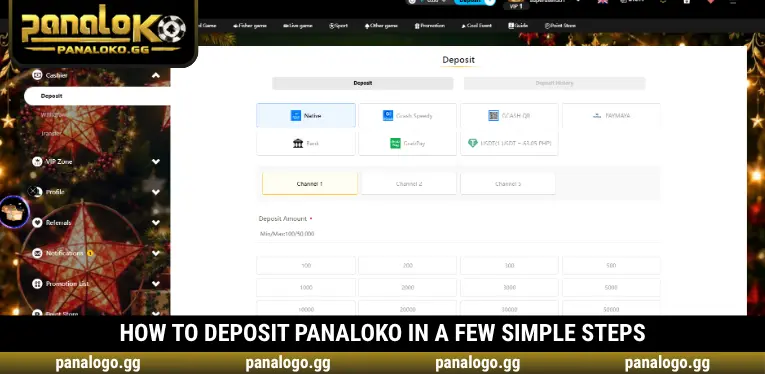
To complete Deposit PANALOKO, members must log into their accounts and select the Deposit function from the upper navigation bar. We provide payment methods, available channels, and preset amounts within the deposit interface, allowing users to choose their preferred options conveniently.
Step 1 – Log In and Open the Deposit Section
Visit the PANALOKO website and enter your registered Username and Password to access your account. Once logged in, click the blue Deposit button beside the account balance in the upper navigation bar. The system will open the payment interface containing Deposit and Deposit History tabs. Keep the Deposit tab selected to create a new payment request.
Step 2 – Choose Your Preferred Payment Method
The Deposit PANALOKO interface displays Native, GCash Speedy, GCASH QR, PAYMAYA, Bank, GrabPay, and USDT as available payment categories. Select your preferred option to view its corresponding payment channels. Each method may offer multiple channels, so we recommend reviewing the transaction requirements and limits before proceeding.
Step 3 – Select a Channel and Enter Your Deposit Amount
After choosing a payment method, select an available Channel and check the displayed minimum and maximum transaction limits. PANALOKO provides preset amounts such as ₱100, ₱200, ₱500, and higher values depending on the selected channel. Make sure your deposit amount falls within the permitted range and verify the entered value before submitting your request.
Step 4 – Confirm and Complete the Payment
Click Submit to proceed with the payment instructions for your selected method. When using Deposit PANALOKO, members must follow the displayed payment details, including the exact amount, recipient information, and QR code when applicable. Bank transfers may require additional information, such as the account holder’s name, payment time, and transaction receipt for verification purposes.
Step 5 – Check Your Deposit Transaction Status
After completing the payment, return to your account to check your available balance or open Deposit History to review the transaction status. PANALOKO recommends keeping the transaction reference, payment timestamp, and receipt for future verification. If your balance has not been updated, check the existing request before submitting another deposit.
PANALOKO Payment Methods and Deposit Limits
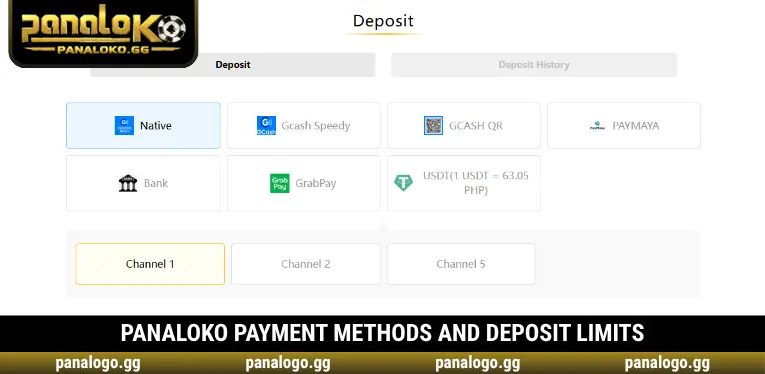
We provide various payment options to accommodate members using electronic wallets, bank accounts, and other supported services in the Philippines. When completing Deposit PANALOKO, minimum and maximum amounts may vary depending on the selected method or Channel. The table below shows the deposit limits displayed in the provided interface screenshots, along with illustrative processing-time estimates for reference when choosing a payment option.
| Payment Method | Deposit Limits | Estimated Processing Time* |
| Native | ₱100 – ₱50,000 | 10–30 seconds |
| GCash Speedy | ₱100 – ₱50,000 | 10–30 seconds |
| GCASH QR | ₱200 – ₱50,000 | 10–50 seconds |
| PAYMAYA | ₱50 – ₱50,000 | 10–50 seconds |
| Bank | ₱50 – ₱50,000 | 10–60 seconds |
| GrabPay | ₱100 – ₱5,000 | 10–30 seconds |
| USDT | Depends on the selected Channel | 10–60 seconds |
Important Tips to Avoid Deposit Errors at PANALOKO
When using Deposit PANALOKO, members should verify their payment information before completing any transaction. We particularly emphasize avoiding previously used QR codes, matching the transferred amount with the submitted request, and keeping payment receipts. Following these precautions can reduce transaction errors and help prevent missing or delayed deposits.
- Never Reuse an Old QR Code: Always use the QR code generated for your current payment request. A previously used code may no longer be valid, preventing the system from identifying your deposit correctly.
- Transfer the Exact Deposit Amount: The actual payment must match the amount selected in the deposit form. Transferring a different amount may require additional verification and could prevent automatic balance updates.
- Check Each Channel’s Limits: Payment channels may have different minimum and maximum amounts, so review the displayed Min/Max values before proceeding. Avoid attempting transactions that exceed the permitted range.
- Use Your Own Payment Account: Members should use bank accounts or e-wallets that legally belong to them. Payments involving another person’s information may create complications during transaction verification.
- Keep Your Payment Receipt: Save the payment confirmation and transaction reference after completing a transfer. These details are useful when requesting assistance with a deposit that has not appeared in your account.
How to Check and Resolve Deposit PANALOKO Issues
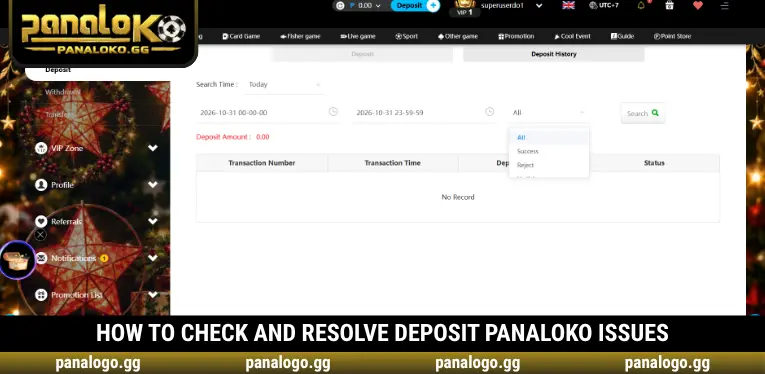
After completing Deposit PANALOKO, members should review Deposit History and compare their payment information if the funds have not been credited. PANALOKO encourages users to prepare the exact amount, payment date, selected method, and transaction reference before contacting support. Common issues may involve expired QR codes, channel limits, incorrect transfer details, or delays in updating the account balance.
| Common Issue | Recommended Solution |
| Payment completed but balance not updated | Check Deposit History and contact support if necessary |
| Incorrect transfer amount | Keep the receipt and request a transaction review |
| Expired or previously used QR code | Do not reuse it; check the current payment request |
| Unable to select a Channel | Try another available payment channel |
| Receipt upload fails | Check the image and upload it again |
| Transaction rejected | Review the displayed limits and system notification |
Conclusion
Deposit PANALOKO offers multiple payment options with flexible limits, allowing members to fund their accounts through e-wallets and bank transfers. At PANALOKO, we provide deposit channels, transaction details, and payment history features to support convenient account management. Players should verify payment amounts, use the correct QR codes, and retain their receipts to avoid errors. Log in, open Deposit, and choose a payment method that suits your personal budget.
FAQs about Deposit PANALOKO
Some payment situations may require additional clarification after a transaction has been submitted. These answers address practical concerns about payment requests, account verification, and transaction handling.
Can I cancel a deposit request after clicking Submit?
Cancellation depends on the request status and payment method. If you have not transferred the funds, check whether the request can be canceled or contact support before creating another transaction.
Does Deposit PANALOKO charge transaction fees?
Transaction fees may depend on the bank, e-wallet, or payment provider involved. Check any applicable charges before confirming your transfer.
Can I deposit funds before completing account verification?
This depends on your account status and the selected payment channel. Some transactions may require additional identity verification before processing.
What should I do if I transfer money twice for the same request?
Keep both payment receipts and contact customer support for a transaction review. Avoid sending additional funds until the previous payments have been checked.
Can I change my Deposit PANALOKO payment method after submitting a request?
If the request has not been paid, check its status and create a new request using another method when permitted. Never transfer funds using payment details from a different channel.

PANALOKO Team is the in-house content team at panalpko.gg, covering online casino games, sports betting, online sabong, and player guides for the Philippines market. All articles are reviewed by Founder & CEO Regine Velasquez before publication.