

Login PANALOKO allows registered members to access their online casino accounts using a username and password or supported social login options. At PANALOKO, we provide a convenient sign-in form directly on our homepage, featuring Remember Me and Forgot Password functions. This casino login guide helps players in the Philippines access their accounts, resolve common sign-in problems, and protect personal information while using our online gaming services.
Sign In to PANALOKO in a Few Simple Steps
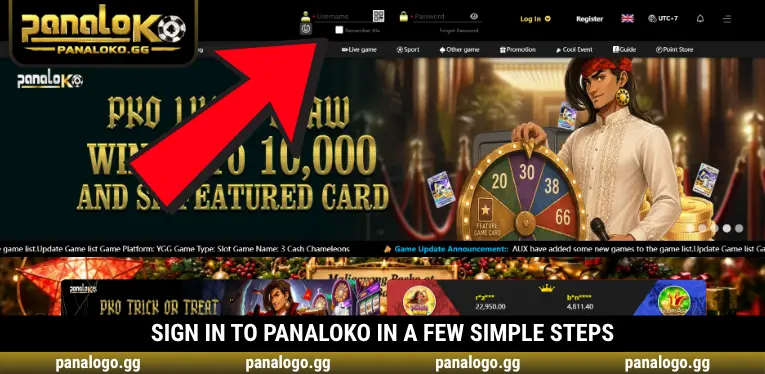
To complete Login PANALOKO, members can visit our homepage and use the login form displayed in the upper navigation bar. We provide Username and Password fields alongside the Log In button, allowing users to access their accounts without navigating to a separate page.
Step 1 – Open the PANALOKO Homepage
Visit the PANALOKO website using your preferred browser and locate the login section in the upper navigation bar. The form appears next to the Register button and language selection options, making it easy for returning members to identify. Before entering any credentials, verify that you are accessing the correct website to avoid fraudulent pages designed to imitate our platform.
Step 2 – Enter Your Username and Password
Enter your registered username in the Username field, then type your corresponding password into the Password box. You can select the eye icon to reveal the entered characters and check their accuracy. PANALOKO recommends reviewing uppercase letters, lowercase letters, numbers, and special characters before submitting your credentials to avoid unnecessary authentication errors.
Step 3 – Review the Remember Me Option
The Remember Me checkbox appears below the Username field and provides an optional convenience feature for returning members. When completing Login PANALOKO, users can enable or disable this option according to their preferences. We recommend leaving it unchecked on shared or public devices to reduce the possibility of another person accessing your account.
Step 4 – Click Log In to Access Your Account
After entering the required information, select Log In to submit your authentication request. If your credentials are valid, you can proceed to your member account and access the available services. If an error appears, review the entered information before trying again or use the password recovery function when necessary.
Access PANALOKO Through Facebook or Google
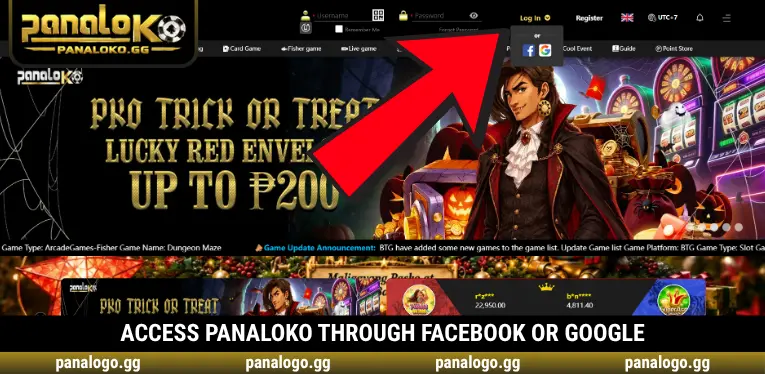
Besides standard account authentication, PANALOKO displays Facebook and Google options in the dropdown menu beside the Log In button. Members can open this menu and choose their preferred authentication provider. The selected service may request additional identity confirmation or permissions before allowing account access, depending on its authentication requirements and any existing account connection.
When using Login PANALOKO through social accounts, make sure the selected Facebook or Google profile is connected to the intended casino account. We encourage members to review authentication prompts carefully and avoid following unfamiliar sign-in requests received through messages or third-party websites. Using the options displayed on our homepage helps reduce the risk of entering credentials on impersonation pages.
Common Login PANALOKO Errors and How to Fix Them
Members may occasionally experience difficulties with Login PANALOKO because of incorrect credentials, browser problems, or account authentication issues. At PANALOKO, we encourage users to identify the displayed error before repeating the login process. Checking the cause of a failed attempt can prevent unnecessary submissions and help members determine whether password recovery or customer assistance is required.
- Incorrect Username or Password: Review your registered username and password, paying attention to capitalization and special characters. Use the eye icon to check the entered password before selecting Log In again.
- Forgotten Account Password: Select Forgot Password beneath the login form to access the available recovery instructions. Avoid repeatedly guessing passwords when you cannot remember the correct credentials.
- Website Loading Problems: Check your internet connection, refresh the page, or try another browser if the website fails to load. If the issue continues, verify your network connection and avoid submitting login details through unfamiliar websites.
- Facebook or Google Authentication Issues: Confirm that you are signed in to the correct social account and review any authentication requests. The selected account should match the profile previously connected to your casino membership.
- Page Not Responding After Login: Check whether the page has finished loading and whether your connection remains stable. If the problem persists, contact customer support with a description of the issue and any visible error messages.
Essential Security Tips for Your PANALOKO Account
Protecting account credentials is an important responsibility whenever members access online gaming services. Before completing Login PANALOKO, we encourage users to check the website address, choose a trusted device, and avoid disclosing sensitive authentication information. PANALOKO recommends following these security practices to reduce the risk of unauthorized account access or exposure of personal information.
- Create a Unique Password: Avoid using the same password for your casino account, email, banking applications, or social media profiles. Unique credentials reduce the potential impact if another online service experiences a security breach.
- Never Share Authentication Details: Keep passwords, verification codes, and one-time passwords confidential. Unauthorized individuals may use these details to access accounts or attempt to change personal information.
- Use Remember Me Carefully: Enable this option only on devices under your control and avoid using it on public computers. Shared devices may retain access information that could expose your account to other users.
- Verify the Login Website: Check the website before submitting your username and password, especially when opening pages from messages. Fraudulent websites may imitate legitimate login forms to collect credentials.
- Log Out After Each Session: End your account session when you finish using the platform, particularly on shared devices. Logging out reduces the chance of another person accessing your account without permission.
Recover Your PANALOKO Password and Restore Account Access
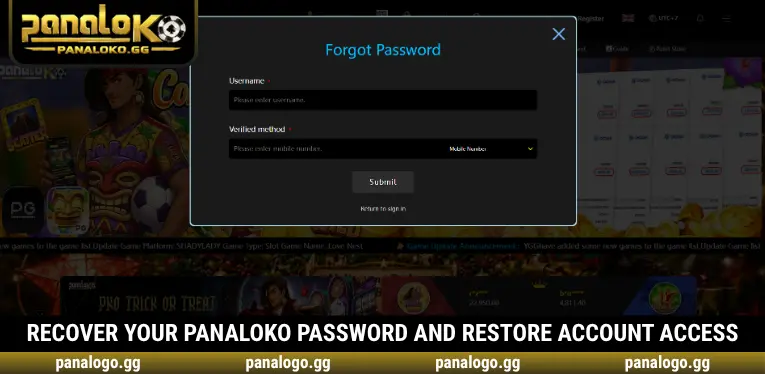
If you cannot remember your password, select Forgot Password beneath the Password field on our homepage. This function provides access to the available account recovery process and its corresponding instructions. PANALOKO encourages members to follow the displayed verification requirements carefully and submit information only through the appropriate recovery interface or verified support channels.
If the recovery process cannot be completed, contact our customer support team and explain the problem. We recommend preparing your username and relevant account details while keeping passwords and one-time verification codes private. After restoring access, review your account information and update your security credentials if necessary. Players in the Philippines should also ensure their account details remain accurate and comply with applicable participation requirements.
Conclusion
Login PANALOKO provides convenient account access through registered credentials and supported Facebook or Google authentication options. At PANALOKO, we offer Remember Me, Forgot Password, and straightforward sign-in features to help members manage account access. Verifying your credentials and following safe login practices can reduce unnecessary problems. Visit our homepage, select your preferred sign-in method, and access your casino account securely.

PANALOKO Team is the in-house content team at panalpko.gg, covering online casino games, sports betting, online sabong, and player guides for the Philippines market. All articles are reviewed by Founder & CEO Regine Velasquez before publication.