

Register PANALOKO allows new players to create a free casino account through a straightforward registration form. At PANALOKO, we provide a signup process requiring a username, password, mobile number, and verification code, alongside Facebook and Google registration options. This account creation guide helps players in the Philippines complete registration, understand the required information, and prepare their profiles for accessing our online gaming services.
How to Register PANALOKO and Create Your Account
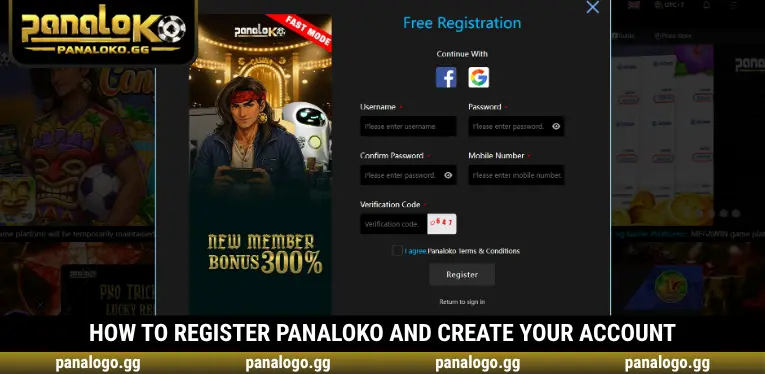
Getting started with Register PANALOKO requires opening the Free Registration form from our homepage and completing the mandatory fields. We organize the process into four steps, allowing new members to create their login credentials, confirm their information, and submit their registration request.
Step 1 – Open the Free Registration Form
Visit the PANALOKO homepage and locate the Register button in the upper-right navigation bar, next to the login area. Click Register to open the Free Registration window, where the available signup options and mandatory fields are displayed. Make sure you are using the correct website before entering personal information or creating your account.
Step 2 – Enter Your Username and Password
Choose a username and enter it in the Username field, then create your account password using the Password box. Reenter the same password in Confirm Password to ensure both entries match exactly. PANALOKO recommends selecting a unique password rather than reusing credentials associated with your email, banking applications, or other online accounts.
Step 3 – Provide Your Mobile Number and Verification Code
Enter your active phone number in the Mobile Number field, ensuring the digits are correct before proceeding. Next, locate the verification image displayed beside the Verification Code field and type the characters exactly as shown. When completing Register PANALOKO, check both entries carefully because incorrect or missing information may prevent the form from being submitted.
Step 4 – Accept the Terms and Complete Registration
Read the Terms & Conditions displayed beneath the registration fields before selecting the agreement checkbox. Once the required information has been completed, click the Register button at the bottom of the window to submit your request. PANALOKO will process the information through the registration system, and any validation errors should be corrected according to the displayed instructions.
Register PANALOKO Using Facebook or Google
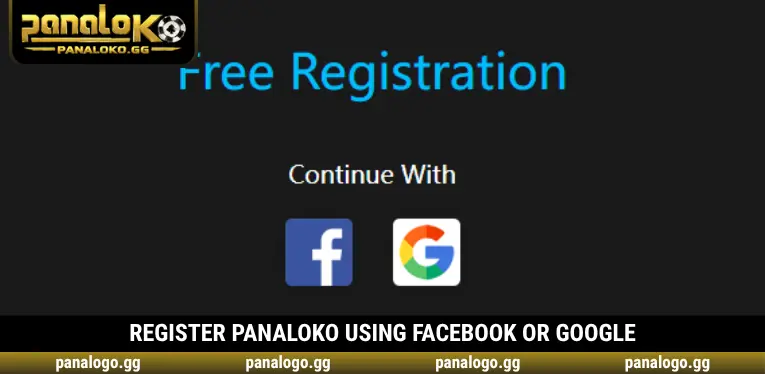
In addition to standard account registration, PANALOKO displays Facebook and Google options under the Continue With section. Players can select either icon to begin the corresponding account connection process, following the authentication instructions presented by the selected provider. These options provide an alternative to manually completing the traditional registration form.
When choosing a social account, users should verify which Facebook or Google profile is currently active and review any requested permissions. We recommend completing Register PANALOKO only through the options available on our website, rather than following unfamiliar messages or third-party login pages. Additional account information may still be required depending on the process shown.
Complete Your PANALOKO Profile After Registration
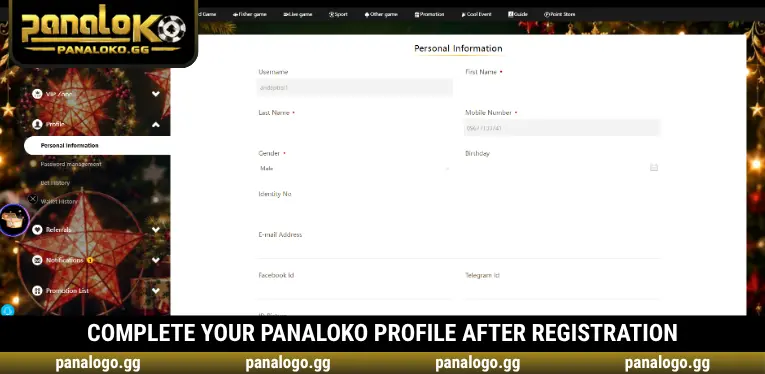
Once Register PANALOKO is completed and account access is available, members can open Profile and select Personal Information to update their details. PANALOKO provides sections for personal identification, contact information, document uploads, and account connections. Completing the relevant fields accurately helps members manage their profiles and prepare for identity verification or payment-related requirements.
- Update Personal Information: Enter your first name, last name, gender, and other requested details accurately. Information should match your identification documents to reduce potential verification discrepancies.
- Complete Contact Details: Review your registered mobile number and add an email address where appropriate. Providing accurate contact information helps avoid problems when account-related communication is necessary.
- Upload Identification Documents: Use the ID Picture section and select Click to Upload when identity documentation is required. Ensure images are clear and submit them only through the designated account interface.
- Manage Social Account Connections: The Social Account Binding section displays Facebook and Google connection options. Review which accounts are connected and confirm that you control each profile.
- Review Payment Information: Access the Payment Info section to manage applicable payment details. Use information belonging to you and verify its accuracy before saving any changes.
Common PANALOKO Registration Errors and Solutions
Some members may encounter difficulties when completing Register PANALOKO, particularly if the confirmation password does not match, a mandatory field is missing, or the verification code is entered incorrectly. PANALOKO recommends checking the registration form carefully before submitting another request. The following solutions address common input and access problems without requiring members to repeatedly create new accounts.
| Registration Issue | Recommended Solution |
| Registration window does not appear | Check your connection and reload the homepage |
| Password confirmation does not match | Reenter Password and Confirm Password |
| Incorrect verification code | Compare your entry with the displayed characters |
| Missing required information | Review the fields marked with red indicators |
| Agreement checkbox not selected | Read the terms and select the checkbox |
| Registration request still fails | Contact customer support for assistance |
Protecting Your Account After Successful Registration
After completing Register PANALOKO, members should prioritize account security before using additional services. We recommend keeping login credentials private, reviewing the Password Management section when changes are necessary, and avoiding saved passwords on shared or public devices. PANALOKO also encourages members to monitor their account information and report suspicious access through the appropriate support channels.
Players in the Philippines must meet the applicable legal participation requirements, including the minimum age and permitted jurisdiction conditions. Account creation does not automatically remove any additional identity verification or transaction requirements. Members should review our service terms and provide accurate information whenever further checks are necessary to maintain account security and prevent avoidable processing difficulties.
Conclusion
Register PANALOKO provides a free account creation process with clear fields for login credentials, mobile details, and verification. At PANALOKO, we also offer Facebook and Google connection options alongside profile management features for new members. Completing your information correctly helps support account security and future verification. Follow our signup instructions, review the applicable terms, and create your casino account through the official registration form.

PANALOKO Team is the in-house content team at panalpko.gg, covering online casino games, sports betting, online sabong, and player guides for the Philippines market. All articles are reviewed by Founder & CEO Regine Velasquez before publication.